

Our Bloggers
Categories
More Info
OTN
Blogroll
Top Rated Blogs
Written by Sharon Airhart
on February 13, 2015
Who could have imagined, even a few years ago, that holding a fingertip to your mobile phone screen would tell you your blood pressure? Yet, today, you can buy any one of a number of apps that does just that.
There’s only one problem. You’re most likely not getting an accurate blood pressure reading.
“Not ready for prime time,” is how Dr. Nilay Kumar described the technology to Reuters Health last month. Kumar is an attending physician at the Cambridge Health Alliance in Cambridge, Mass., and a Harvard Medical School instructor. He’s lead author on a study that analyzed the top 107 apps for “hypertension” and “high blood pressure”. Most – about 75 per cent – were found to... | |
 |
Comments
Written by Sylvie Gaskin
on January 30, 2015
Here are some tips and friendly reminders when making use of OTN’s Webcasting service if you’re the Organizer, Presenter, and/or Participant:
Place a sign for use outside the door of the Telemedicine Studio or room when a videoconference session is under way. The sign might read "Session in progress, please do not disturb." You can also order up to five door hangers from OTN.
"Mic-off" setting should be enabled prior to and at the conclusion of your session.
Always confirm that you have the correct system number before dialing a participant site.
Practice good etiquette by doing roll-call and introducing everyone... | |
|
Written by Allan Zahara
on January 20, 2015
OTN, with the Centre of Effective Practice, is pleased to present “Cognitive Behavioural Therapy for Anxiety” - a three-part educational workshop series. The program, designed by leading experts from Sunnybrook’s Fredrick W. Thompson Anxiety Disorders Centre including world-renowned psychiatrist and lecturer Dr. Peggy Richter, is back by popular demand after receiving rave reviews from an OTN audience last year.
Here’s what a few participants from 2014 had to say...
We have very much benefited from this series and will be following up internally on our practice and processes in this regard.
Thank you very much for this highly informative, concise and well organized series.
We enjoyed the sessions very much.... | |
|
Written by Ed Brown
on December 5, 2014
What a year it’s been for Ontario Telemedicine Network (OTN)!
With all the hard work, dedication and passion our partners and employees have devoted to delivering innovative telemedicine solutions, it comes to no surprise that telemedicine continues to grow both in scope and adoption. Last year alone, OTN supported more than 390,000 patient consultations, working with 1,300 healthcare organizations and more than 8,000 healthcare providers in 1,748 sites across Ontario. As a result, almost 260 million kilometers of patient travel was avoided. That represents nearly 330 trips to the moon and back!
Telemedicine is truly transforming our healthcare system with a new model of care delivery – one that improves access, increases... | |
|
Written by Tricia Staples
on November 28, 2014
The next frontier for a sustainable health system is home and community care, according to Health Minister Dr. Eric Hoskins. At the recent Health Quality Ontario Transformation conference, Minister Hoskins talked about the need for a patient- and family-centred health system.
Minister at #HQT2014 states next frontier is home & community health. @OTNtelemedicine Telehomecare can help us achieve this.
— Angela Nickoloff (@2rhods) November 20, 2014
At OTN, we’re... | |
|
Written by Ed Brown
on October 27, 2014
 | The rate of change in the digital world is nothing short of dazzling. The way we work, communicate and collaborate continues to evolve with new services and applications being introduced every day.
So it gives me great pleasure to announce the launch of the OTNhub, the new one-stop telemedicine service that delivers enhanced convenience and functionality to Ontario’s healthcare providers.
When the integration of OTN services is fully completed in the near future, the OTNhub will allow Primary Care Providers, Specialty Care Providers (specialists and allied health providers) and Healthcare Organizations to access all services relevant to them with a single sign-in. From... |
|
Written by Tricia Staples
on September 15, 2014
What do playing Monopoly, driving a car, and baking cupcakes have in common? They all have rules to be followed. Generally, rules aim to ensure fairness, protect from harm, and instruct on how best to do something.
As a regulatory body, the College of Physicians and Surgeons of Ontario (CPSO) maintains a set of rules, in the form of policies, to guide physicians on how best to provide patient care. The CPSO revises these polices from time to time, with input from key stakeholders. This past July and August, the CPSO held a public consultation on draft revisions to its Telemedicine policy.
Given our extensive expertise in telemedicine, OTN submitted a response to this where we proposed changes to the Telemedicine policy that will help... | |
|
Written by Anatoli Freiman
on July 22, 2014
OTN Teledermatology is a free service allows primary care physicians to securely send a digital photograph and brief description of patient’s skin condition to a dermatologist.
Here are five pearls to benefit most from OTN Teledermatology:
1) Ensure to provide essential OTN Teledermatology referral information:
Referring GP info: GP name, MOH/billing (not CPSO) number, phone number
Patient information: correct name, DOB, valid health card and correct version
Ideally, one issue per patient consult and avoid multiple submissions
Brief relevant history, pertinent positives and negatives
Details of drug plan: e.g. work plan or ODB
Good pictures, i.e.... | |
|
Written by Rob Williams
on June 19, 2014
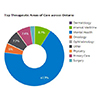 | Have you and your telemedicine colleagues ever wondered how often you use telemedicine compared to other areas of the province? Or how much telemedicine activity occurred in one LHIN versus another LHIN? Or what kinds of therapeutic areas of care were most popular over OTN’s network?
We’ve revamped the way we present our provincial and LHIN data to include historical information that can be displayed in a series of interactive Google Charts. Here’s a quick overview of what you can see with our new interactive LHIN charts (click to view):
... |
|
Written by Rob Williams
on May 2, 2014
Health & Wellness App: Screenshot from <30 Days iPhone app by Heart and Stroke Foundation of Canada
Apps have grown in popularity over the last few years; in fact, Apple’s App Store has over a million apps with many focusing on healthcare. Suffice to say, apps are becoming very important to consumers in North America. I see apps as being in two categories: the first category is wellness, for example apps that deal with smoking cessation, weight loss, healthy eating choices, lifestyle issues for hypertension, etc. These apps can be useful as coaching aids for people to self-manage. The second category is apps that assist... | |
|
Pages

OTN is an independent, not-for-profit
organization funded by the
Government of Ontario.
Healthcare Working Smarter




Stay Connected
Social


Video


RSS


What we do
OTN provides Telemedicine solutions for healthcare organizations and professionals.